


Dev Center
Dev Center
Camera
1. IGRIS-C Camera Topic List
Starting with 2.1.1, camera images are published directly by the camera service on the robot PC (the 2.1.0 Jetson relay setup and the reserved DDS domain 1 have been removed). The camera uses the same domain id, robot unit namespace and transport as the robot, so you receive it with the same settings as the other SDK topics.
Data Topic - standard message types
sensor_msgs/Image/sensor_msgs/CompressedImage/sensor_msgs/ImuTopicName
Message Type
Default output
Description
sensor/d435_color/compressedsensor_msgs/CompressedImageJPEG, 640×480, 15 fps
RealSense D435 RGB image data
sensor/d435_depthsensor_msgs/Image16UC1 (raw), 640×480, 15 fps
RealSense D435 depth image data. Aligned to the color image by default
sensor/d435_ir_left/sensor/d435_ir_rightsensor_msgs/Imagemono8 (raw), 640×480, 15 fps
RealSense D435 left/right IR image data
sensor/d435_imusensor_msgs/Imuapprox. 200 Hz
RealSense D435i IMU (angular velocity, acceleration)
sensor/eyes_stereo/compressedsensor_msgs/CompressedImageJPEG, 1280×480, 15 fps
IGRIS-C head stereo camera image data. The left and right 640×480 images side by side in one frame (left half = left camera)
sensor/left_hand/compressedsensor_msgs/CompressedImageJPEG, 640×480, 20 fps
IGRIS-C left hand end-effector image data
sensor/right_hand/compressedsensor_msgs/CompressedImageJPEG, 640×480, 20 fps
IGRIS-C right hand end-effector image data
Each image stream exists in two forms, raw sensor/<name> (sensor_msgs/Image) and compressed sensor/<name>/compressed (sensor_msgs/CompressedImage), and the camera publishes only one of them depending on its settings (format, depth_format). The table above shows the defaults. For example, setting d435.depth_format to png16 moves depth to sensor/d435_depth/compressed (16-bit PNG). CompressedImage.format follows the standard ROS convention (e.g. bgr8; jpeg compressed bgr8).
The 2.1.0 igris_c::msg::dds::CompressedMessage type, the igris_c/sensor/* topics and the four camera configuration services have been removed. See section 3 for changing settings.
Actual topic names by transport
The topics in the table are bare names; the actual topic name is determined by the robot's transport (igris_c.network.transport). See “3. Transport Mode” on the SDK Overview page for details.
Transport | Actual topic name of | How to receive |
|---|---|---|
|
|
|
|
|
|
|
|
|
If the transport, topic layout, namespace or domain id differs between the robot and the client, no images arrive and no error is reported (0 FPS).
Image frames (frame_id)
header.stamp is the time the sensor acquired the image on the d435_* topics, and the publish time on the eyes_stereo, left_hand and right_hand topics. The header.frame_id values are:
Topic |
| Corresponding URDF link |
|---|---|---|
|
|
|
|
|
|
|
|
|
|
|
|
|
|
|
|
|
|
|
|
|
|
|
|
⚠️ The
frame_idof the image messages differs from the link names in the robot model (URDF); only the IMU matches. When looking up camera poses with TF, use the URDF link names in the table above instead offrame_id. Camera links are ROS optical frames (+Z forward, +X right, +Y down). For mounting positions, see the Specs (Camera) page.
2. Camera Topic API
SDK Initialization
#include <igris_c_sdk/channel_factory.hpp>
#include <igris_c_sdk/igris_c_msgs.hpp>
#include <igris_c_sdk/subscriber.hpp>

#include <iostream>
#include <string>

using namespace igris_c_sdk;

int main() {
    // Initialize SDK with domain ID and robot namespace (must match the robot)
    int domain_id  = 0;
    std::string ns = "igris_c_IG01";  // robot unit namespace
    // 4th argument: TopicNaming::Native (default) if the robot's transport is cyclonedds_native,
    //               TopicNaming::RosCompatible if it is cyclonedds_ros_compatible
    ChannelFactory::Instance()->Init(domain_id, ns, "", TopicNaming::Native);
    if (!ChannelFactory::Instance()->IsInitialized()) {
        std::cerr << "Failed to initialize ChannelFactory" << std::endl;
        return 1;
    }

    // Topic subscriptions follow (the camera has no services)
}
Image Subscriber Example
#include <opencv2/imgcodecs.hpp>

using CompressedImage = sensor_msgs::msg::dds_::CompressedImage_;
using Image           = sensor_msgs::msg::dds_::Image_;

// Compressed streams (d435_color, eyes_stereo, left_hand, right_hand): JPEG
Subscriber<CompressedImage> color_sub("sensor/d435_color/compressed", QosProfile::SensorData());
color_sub.init([](const CompressedImage &msg) {
    cv::Mat raw(1, static_cast<int>(msg.data().size()), CV_8UC1,
                const_cast<uint8_t*>(msg.data().data()));

    cv::Mat img = cv::imdecode(raw, cv::IMREAD_UNCHANGED);  // BGR
});

// Raw streams (d435_depth: 16UC1, d435_ir_left / d435_ir_right: mono8)
Subscriber<Image> depth_sub("sensor/d435_depth", QosProfile::SensorData());
depth_sub.init([](const Image &msg) {
    cv::Mat depth(static_cast<int>(msg.height()), static_cast<int>(msg.width()), CV_16UC1,
                  const_cast<uint8_t*>(msg.data().data()), msg.step());
});

// Keep the subscribers alive while receiving, and call stop() before exiting.
JPEG-compressed image transmission
Depth and IR are sent uncompressed (
sensor_msgs/Image)Receiving every stream at once needs about 22 MB/s. On Wi-Fi, subscribe only to the streams you need (the example viewers can turn each stream's subscription on and off).
Running the example viewers
# cyclonedds_native / cyclonedds_ros_compatible transport (after setting CYCLONEDDS_URI)
./cyclonedds_sensor_viewer <domain_id> <namespace> [topics...] [--dds-topic-naming native|ros_compatible]
python3 sensor_viewer.py --domain-id <domain_id> --namespace <namespace> [--dds-topic-naming native|ros_compatible]
Receiving on the ROS 2 transport (ros)
If the robot's transport is ros, receive with the ros2/ package examples in the SDK deliverable. Image frames are split into many UDP datagrams, so run ros2/setup_client_network.sh once on the receiving PC to enlarge the receive buffer and IP reassembly settings. Without it, the control topics and the IMU work but every image topic stays at 0 Hz.
# Run once on the receiving PC (receive buffer / IP reassembly tuning, uses sudo, persists across reboots)
cd <SDK deliverable>/ros2
./setup_client_network.sh

# Receive images on the ros transport
ROS_DOMAIN_ID=<domain_id> ros2 run igris_c_sdk ros_sensor_viewer --ros-args -p robot_namespace:=<namespace>
ROS_DOMAIN_ID=<domain_id> ros2 run igris_c_sdk ros_sensor_listener --ros-args -p robot_namespace:=<namespace>
* Examples are available in the GitHub repository:
https://github.com/robrosinc/igris_c_sdk_public
Image data subscription in C++
Image data subscription in Python
Image data subscription in ROS 2
Stream reception check (text) in ROS 2
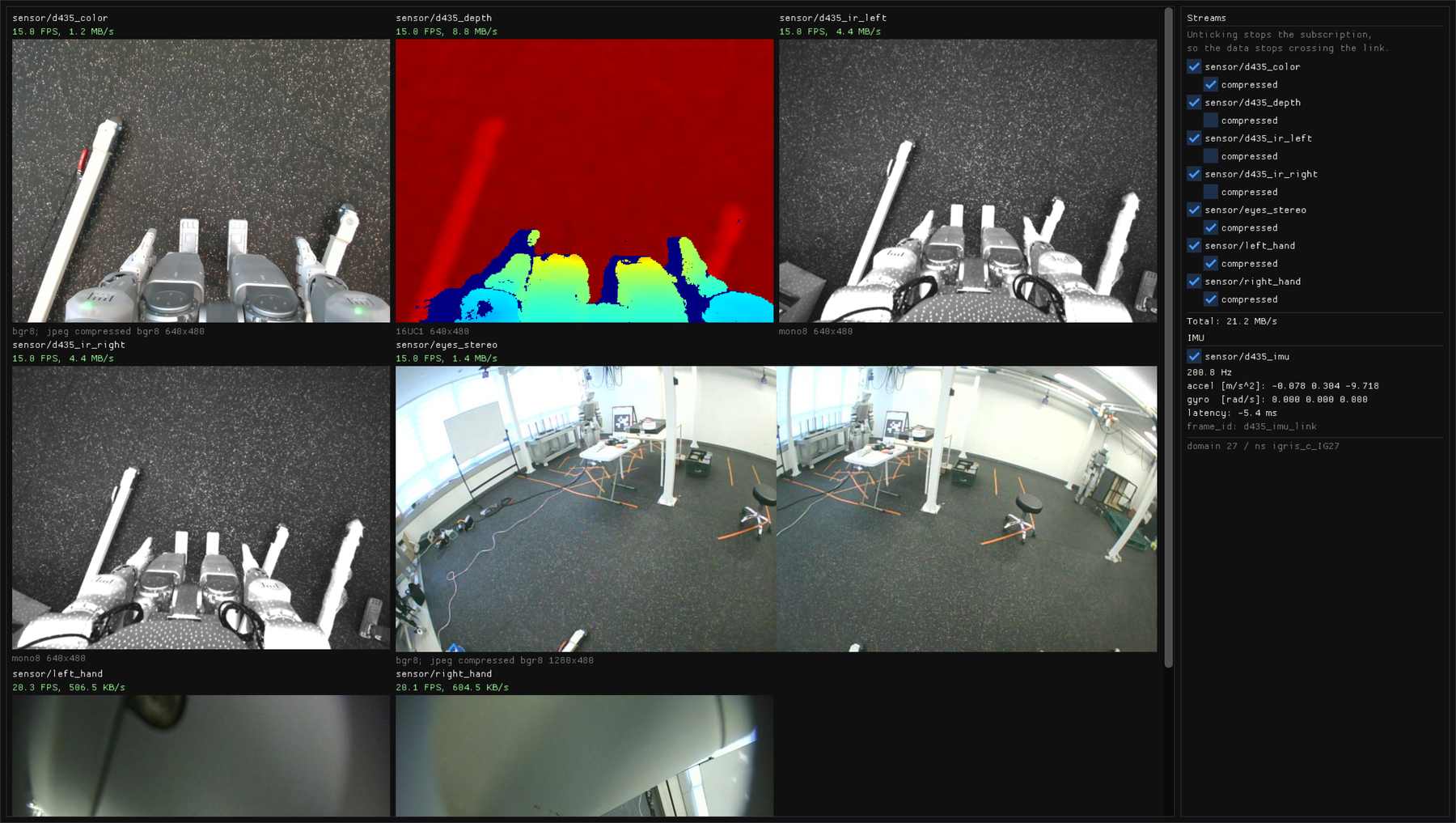
ros_sensor_viewer in action: all seven camera streams and the D435 IMU at once; the right-hand panel toggles each subscription (real robot, domain 27).
3. Changing Camera Settings
The 2.1.0 camera configuration services (realsense_config_request, stereo_config_request, mono_config_request, camera_config_response) have been removed. Resolution, frame rate, stream on/off and similar settings are changed in the robot's camera settings file camera.yaml, which you edit in the Web Viewer.
Open the Web Viewer and select CAMERA CONFIG › camera config on the Config tab.
Change the values and save.
Press [Restart services] to restart the Camera service and apply the change. The image streams drop briefly during the restart.
Group | Key | Default | Options | Description |
|---|---|---|---|---|
|
|
|
| Publish the RGB / depth / IR (left and right) / IMU stream |
|
|
| Frame rate shared by color, depth and IR | |
|
| 0–100 | Color JPEG quality | |
|
|
| IR dot projector. | |
|
| read-only | Published resolution | |
|
|
|
| Publish the stream |
|
|
| Frame rate | |
|
| 0–100 | JPEG quality | |
|
| read-only | Published resolution (left and right side by side) | |
|
|
|
| Publish the left/right hand camera streams |
|
|
| Frame rate (changed from the 2.1.0 default of 15) | |
|
| 0–100 | JPEG quality | |
|
| read-only | Published resolution (captured at 1920×1200 and scaled down) |
Only the public keys above appear for regular users. In admin mode you can also change d435.initial_reset (default false; true hardware-resets the camera before start-up and adds 5–8 s; the 2.1.0 default was true), d435.depth_format (raw / png16), d435.align_depth (default true, aligns depth to the color image), and each camera's format (jpeg / png). The transport is not set in camera.yaml: it comes from igris_c.network.transport in robot config and applies to the bridge and the camera together.
Camera
1. IGRIS-C Camera Topic List
Starting with 2.1.1, camera images are published directly by the camera service on the robot PC (the 2.1.0 Jetson relay setup and the reserved DDS domain 1 have been removed). The camera uses the same domain id, robot unit namespace and transport as the robot, so you receive it with the same settings as the other SDK topics.
Data Topic - standard message types
sensor_msgs/Image/sensor_msgs/CompressedImage/sensor_msgs/ImuTopicName
Message Type
Default output
Description
sensor/d435_color/compressedsensor_msgs/CompressedImageJPEG, 640×480, 15 fps
RealSense D435 RGB image data
sensor/d435_depthsensor_msgs/Image16UC1 (raw), 640×480, 15 fps
RealSense D435 depth image data. Aligned to the color image by default
sensor/d435_ir_left/sensor/d435_ir_rightsensor_msgs/Imagemono8 (raw), 640×480, 15 fps
RealSense D435 left/right IR image data
sensor/d435_imusensor_msgs/Imuapprox. 200 Hz
RealSense D435i IMU (angular velocity, acceleration)
sensor/eyes_stereo/compressedsensor_msgs/CompressedImageJPEG, 1280×480, 15 fps
IGRIS-C head stereo camera image data. The left and right 640×480 images side by side in one frame (left half = left camera)
sensor/left_hand/compressedsensor_msgs/CompressedImageJPEG, 640×480, 20 fps
IGRIS-C left hand end-effector image data
sensor/right_hand/compressedsensor_msgs/CompressedImageJPEG, 640×480, 20 fps
IGRIS-C right hand end-effector image data
Each image stream exists in two forms, raw sensor/<name> (sensor_msgs/Image) and compressed sensor/<name>/compressed (sensor_msgs/CompressedImage), and the camera publishes only one of them depending on its settings (format, depth_format). The table above shows the defaults. For example, setting d435.depth_format to png16 moves depth to sensor/d435_depth/compressed (16-bit PNG). CompressedImage.format follows the standard ROS convention (e.g. bgr8; jpeg compressed bgr8).
The 2.1.0 igris_c::msg::dds::CompressedMessage type, the igris_c/sensor/* topics and the four camera configuration services have been removed. See section 3 for changing settings.
Actual topic names by transport
The topics in the table are bare names; the actual topic name is determined by the robot's transport (igris_c.network.transport). See “3. Transport Mode” on the SDK Overview page for details.
Transport | Actual topic name of | How to receive |
|---|---|---|
|
|
|
|
|
|
|
|
|
If the transport, topic layout, namespace or domain id differs between the robot and the client, no images arrive and no error is reported (0 FPS).
Image frames (frame_id)
header.stamp is the time the sensor acquired the image on the d435_* topics, and the publish time on the eyes_stereo, left_hand and right_hand topics. The header.frame_id values are:
Topic |
| Corresponding URDF link |
|---|---|---|
|
|
|
|
|
|
|
|
|
|
|
|
|
|
|
|
|
|
|
|
|
|
|
|
⚠️ The
frame_idof the image messages differs from the link names in the robot model (URDF); only the IMU matches. When looking up camera poses with TF, use the URDF link names in the table above instead offrame_id. Camera links are ROS optical frames (+Z forward, +X right, +Y down). For mounting positions, see the Specs (Camera) page.
2. Camera Topic API
SDK Initialization
#include <igris_c_sdk/channel_factory.hpp>
#include <igris_c_sdk/igris_c_msgs.hpp>
#include <igris_c_sdk/subscriber.hpp>

#include <iostream>
#include <string>

using namespace igris_c_sdk;

int main() {
    // Initialize SDK with domain ID and robot namespace (must match the robot)
    int domain_id  = 0;
    std::string ns = "igris_c_IG01";  // robot unit namespace
    // 4th argument: TopicNaming::Native (default) if the robot's transport is cyclonedds_native,
    //               TopicNaming::RosCompatible if it is cyclonedds_ros_compatible
    ChannelFactory::Instance()->Init(domain_id, ns, "", TopicNaming::Native);
    if (!ChannelFactory::Instance()->IsInitialized()) {
        std::cerr << "Failed to initialize ChannelFactory" << std::endl;
        return 1;
    }

    // Topic subscriptions follow (the camera has no services)
}
Image Subscriber Example
#include <opencv2/imgcodecs.hpp>

using CompressedImage = sensor_msgs::msg::dds_::CompressedImage_;
using Image           = sensor_msgs::msg::dds_::Image_;

// Compressed streams (d435_color, eyes_stereo, left_hand, right_hand): JPEG
Subscriber<CompressedImage> color_sub("sensor/d435_color/compressed", QosProfile::SensorData());
color_sub.init([](const CompressedImage &msg) {
    cv::Mat raw(1, static_cast<int>(msg.data().size()), CV_8UC1,
                const_cast<uint8_t*>(msg.data().data()));

    cv::Mat img = cv::imdecode(raw, cv::IMREAD_UNCHANGED);  // BGR
});

// Raw streams (d435_depth: 16UC1, d435_ir_left / d435_ir_right: mono8)
Subscriber<Image> depth_sub("sensor/d435_depth", QosProfile::SensorData());
depth_sub.init([](const Image &msg) {
    cv::Mat depth(static_cast<int>(msg.height()), static_cast<int>(msg.width()), CV_16UC1,
                  const_cast<uint8_t*>(msg.data().data()), msg.step());
});

// Keep the subscribers alive while receiving, and call stop() before exiting.
JPEG-compressed image transmission
Depth and IR are sent uncompressed (
sensor_msgs/Image)Receiving every stream at once needs about 22 MB/s. On Wi-Fi, subscribe only to the streams you need (the example viewers can turn each stream's subscription on and off).
Running the example viewers
# cyclonedds_native / cyclonedds_ros_compatible transport (after setting CYCLONEDDS_URI)
./cyclonedds_sensor_viewer <domain_id> <namespace> [topics...] [--dds-topic-naming native|ros_compatible]
python3 sensor_viewer.py --domain-id <domain_id> --namespace <namespace> [--dds-topic-naming native|ros_compatible]
Receiving on the ROS 2 transport (ros)
If the robot's transport is ros, receive with the ros2/ package examples in the SDK deliverable. Image frames are split into many UDP datagrams, so run ros2/setup_client_network.sh once on the receiving PC to enlarge the receive buffer and IP reassembly settings. Without it, the control topics and the IMU work but every image topic stays at 0 Hz.
# Run once on the receiving PC (receive buffer / IP reassembly tuning, uses sudo, persists across reboots)
cd <SDK deliverable>/ros2
./setup_client_network.sh

# Receive images on the ros transport
ROS_DOMAIN_ID=<domain_id> ros2 run igris_c_sdk ros_sensor_viewer --ros-args -p robot_namespace:=<namespace>
ROS_DOMAIN_ID=<domain_id> ros2 run igris_c_sdk ros_sensor_listener --ros-args -p robot_namespace:=<namespace>
* Examples are available in the GitHub repository:
https://github.com/robrosinc/igris_c_sdk_public
Image data subscription in C++
Image data subscription in Python
Image data subscription in ROS 2
Stream reception check (text) in ROS 2
ros_sensor_viewer in action: all seven camera streams and the D435 IMU at once; the right-hand panel toggles each subscription (real robot, domain 27).
3. Changing Camera Settings
The 2.1.0 camera configuration services (realsense_config_request, stereo_config_request, mono_config_request, camera_config_response) have been removed. Resolution, frame rate, stream on/off and similar settings are changed in the robot's camera settings file camera.yaml, which you edit in the Web Viewer.
Open the Web Viewer and select CAMERA CONFIG › camera config on the Config tab.
Change the values and save.
Press [Restart services] to restart the Camera service and apply the change. The image streams drop briefly during the restart.
Group | Key | Default | Options | Description |
|---|---|---|---|---|
|
|
|
| Publish the RGB / depth / IR (left and right) / IMU stream |
|
|
| Frame rate shared by color, depth and IR | |
|
| 0–100 | Color JPEG quality | |
|
|
| IR dot projector. | |
|
| read-only | Published resolution | |
|
|
|
| Publish the stream |
|
|
| Frame rate | |
|
| 0–100 | JPEG quality | |
|
| read-only | Published resolution (left and right side by side) | |
|
|
|
| Publish the left/right hand camera streams |
|
|
| Frame rate (changed from the 2.1.0 default of 15) | |
|
| 0–100 | JPEG quality | |
|
| read-only | Published resolution (captured at 1920×1200 and scaled down) |
Only the public keys above appear for regular users. In admin mode you can also change d435.initial_reset (default false; true hardware-resets the camera before start-up and adds 5–8 s; the 2.1.0 default was true), d435.depth_format (raw / png16), d435.align_depth (default true, aligns depth to the color image), and each camera's format (jpeg / png). The transport is not set in camera.yaml: it comes from igris_c.network.transport in robot config and applies to the bridge and the camera together.