


Dev Center
Dev Center
SDK Overview
⚠️ v2.1.1 compatibility: In 2.1.1, topic names, message types and service names have all changed. A 2.1.0 SDK client cannot communicate with a 2.1.1 robot, and when this happens the two sides silently fail to discover each other, with no error (0 FPS, service timeouts). Replace the SDK distribution with 2.1.1 and rebuild the examples and your own code.
1. Middleware

IGRIS-C uses DDS as its message middleware, employing two main data communication methods: Publish/Subscribe mode and Request/Response mode.
Publish/Subscription
Receivers subscribe to messages, and senders transmit messages to receivers according to the subscription list. This method is primarily used for medium-to-high frequency or continuous data exchange.
Request/Response
Data queries or actions are performed through requests. This method is used for low-frequency data exchange or function switching.
2. Architecture Description
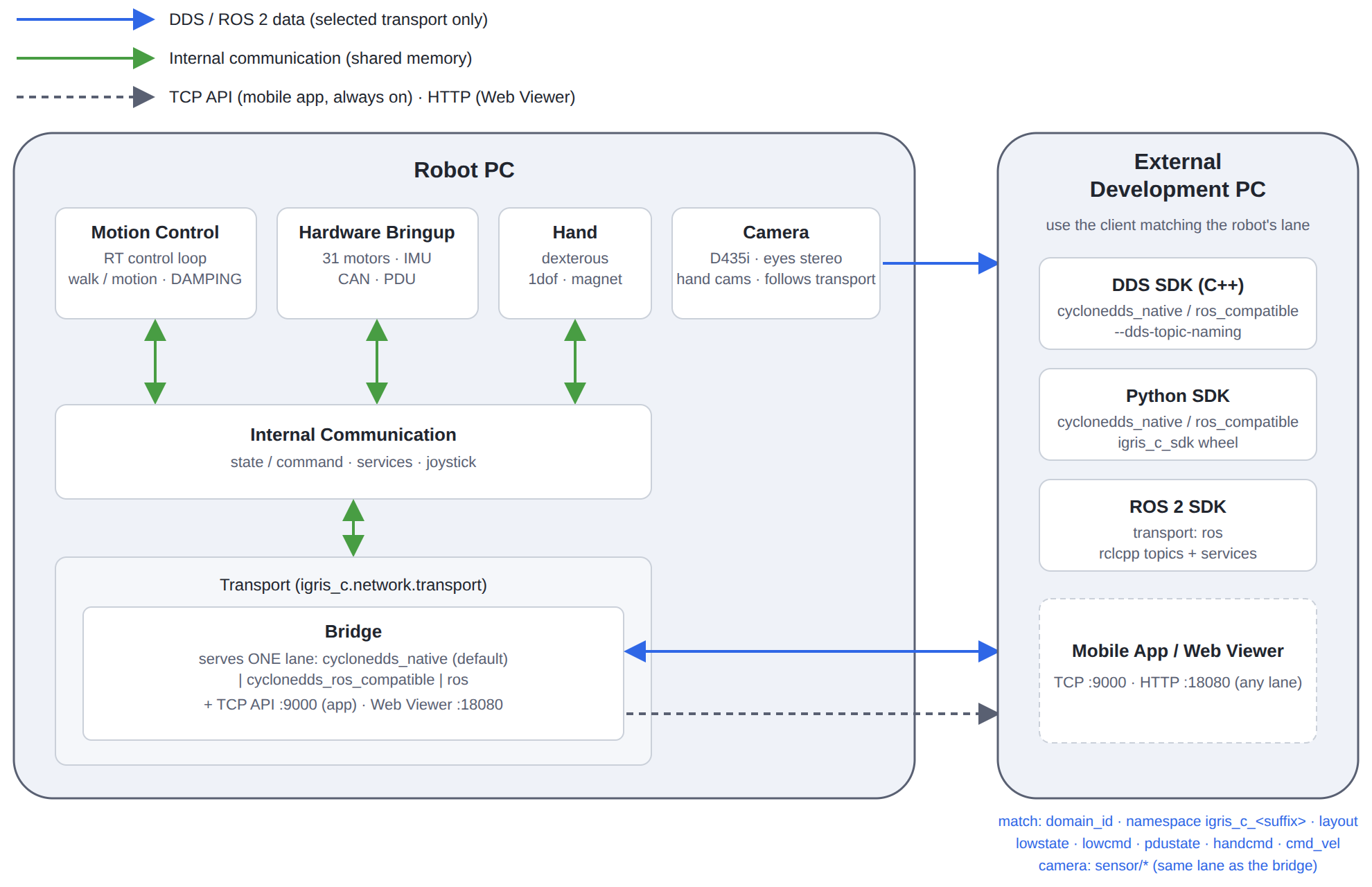
Commands and state information delivered through the SDK are primarily implemented via DDS. The DDS-based communication structure enables reliable, real-time data exchange between modules.
DDS Middleware
IGRIS-C and its related SDKs exchange commands and state information on top of this DDS middleware, providing a scalable and consistent communication structure between internal modules and external development PCs.
Motion Control (the low-level control engine that directly generates and maintains the robot's motion)
The Motion Control module is IGRIS-C's core low-level motion control engine, operating based on a very fast internal control loop.
Key Features
High-frequency low-level control loop
Control loop execution at μs–ms intervals in the internal control code
High-speed updates of torque, velocity, and position commands for each joint/motor
CAN communication-based motor control
Encodes received control commands into CAN messages and delivers them to each motor
Collects motor status (current, velocity, temperature, angle, etc.) in real time and transmits it to DDS
State information → delivered to DDS middleware
Various sensor values such as IMU, joint angles, and dynamic states are published as DDS topics and can be subscribed to from the development PC
Processing commands received from DDS
Receives DDS motion commands published by an external development PC
Applies them immediately within the control loop and reflects them to the motors
Image Services
The Image Services module handles image stream processing and external communication for IGRIS-C.
Key Features
Camera image processing and streaming
Collects image frames from cameras connected to IGRIS-C
Transmits directly via DDS
Camera streams also follow the robot's transport mode. Receiving them on the ros lane requires a one-time setup on the receiving PC (see Section 3).
Supported interfaces: The SDK provides three client interfaces — DDS (Cyclone DDS), ROS2, and Python. Examples are located in the
cyclonedds/,ros2/, andpython/folders of the distribution respectively. Which interface can reach the robot is decided by the robot's transport mode (see Section 3). (The previous documentation's notice of "ROS2 planned for later" is no longer valid — ROS2 is now officially supported.)
3. Transport Mode
IGRIS-C serves exactly one external communication lane, and the robot's igris_c.network.transport (Web Viewer, Config tab) decides both the lane and the on-the-wire topic layout. The lane applies to the bridge, cameras and master arm alike. The TCP API used by the app (default port 9000) is always served, regardless of the lane.
If ROS 2 cannot be installed or is not used in your environment, use the cyclonedds_native lane with the C++/Python SDK (cyclonedds/, python/). Cyclone DDS is bundled with the SDK, so there is no ROS 2 dependency, and the topics and services are the same as on the ros lane.
Robot | Middleware | Wire name of | Services | Examples to use |
|---|---|---|---|---|
| Cyclone DDS (bundled with the SDK) |
|
|
|
| Cyclone DDS |
| The same topic pairs as above. They do not appear in |
|
| ROS 2 (rclcpp, robot rmw = Fast DDS) |
| Real rclcpp services |
|
Published on every lane:
lowstate,handstate,pdustate,robotstate,odom,torso_twist_odom. Subscribed on every lane:lowcmd,handcmd,cmd_vel(geometry_msgs/TwistStamped). Theroslane additionally provides theimu_state,motor_stateandjoint_statetopics.Selecting the layout on the client: C++
ChannelFactory::Instance()->Init(domain_id, ns, "", TopicNaming::RosCompatible), Pythonchannel.Init(domain_id, ns, "", igc_sdk.parse_topic_naming("ros_compatible")). The examples accept the--dds-topic-namingflag (exceptclient.ipynb).The 2.1.0 values
cycloneddsandbothare no longer used; if one is still set, the robot warns and treats it ascyclonedds_native. DDS and ROS 2 are no longer served at the same time as in 2.1.0.Networks where multicast is blocked (Wi-Fi robot + wired PC): use
cyclonedds/cyclonedds_peers.xmlon the cyclonedds lanes andros2/fastdds_peers.xmlon the ros lane (edit the robot IP into the file's<address>, setFASTRTPS_DEFAULT_PROFILES_FILE, thenros2 daemon stop).ROS_STATIC_PEERSis not a substitute, because it does not widen the participant range.To receive camera streams on the ros lane, run
ros2/setup_client_network.shonce on the receiving PC (sysctl settings for the receive buffer and the IP reassembly pool).
cyclonedds_native (factory default) · cyclonedds_ros_compatible
# from the cyclonedds/ folder of the package (domain id and namespace must match the robot)
export CYCLONEDDS_URI=file://$PWD/cyclonedds_spdp.xml
./build/cyclonedds_gui_client 0 igris_c_IG01               # state monitor GUI (domain 0, unit IG01)
./build/cyclonedds_service 0 igris_c_IG01                  # service console (PDU / torque / hand / control mode)
python3 ../python/sdk_gui_client.py --domain-id 0 --namespace igris_c_IG01   # Python example

# when multicast does not reach the robot — first edit the robot IP into <Peer address> in cyclonedds_peers.xml
export CYCLONEDDS_URI=file://$PWD/cyclonedds_peers.xml

# if the robot runs cyclonedds_ros_compatible, add --dds-topic-naming ros_compatible to each example.
ros
# from the workspace where the ros2/ package is built (ROS_DOMAIN_ID and namespace must match the robot)
ROS_DOMAIN_ID=0 ros2 run igris_c_sdk ros_lowstate_listener --ros-args -p robot_namespace:=igris_c_IG01

# when multicast does not reach the robot — first edit the robot IP into <address> in fastdds_peers.xml
export FASTRTPS_DEFAULT_PROFILES_FILE=$PWD/fastdds_peers.xml
ros2 daemon stop
⚠️ The robot and the client must agree on all four: lane, topic layout, namespace and domain_id. If any one differs, the two sides silently fail to discover each other, with no error (0 FPS, service timeouts). The robot's domain_id is
igris_c.network.cyclonedds.domain_id(default 0).
4. Robot Namespace (topic prefix)
All DDS topics are resolved under a namespace specific to each robot unit. Each unit has a different namespace, in the form of the igris_c_ prefix followed by a per-robot suffix (which varies by unit). Example: igris_c_IG01.
Check the namespace of the robot you connect to in the Web Viewer or on the robot's OLED display.
In the SDK, the namespace is specified using
ChannelFactory::Init(domain_id, namespace).In code, write only the bare topic name (
lowstate); the SDK builds the actual topic name on the wire. Thert/segment is added by the ROS 2 rmw, so the native layout has none.TopicNaming::Native(default, robot oncyclonedds_native): namespaceigris_c_IG01+lowstate→igris_c_IG01/lowstateTopicNaming::RosCompatible(robot oncyclonedds_ros_compatible): →rt/igris_c_IG01/lowstate. This is identical to what the ROS 2 rmw mangles/igris_c_IG01/lowstateinto, so a rclcpp node can subscribe without switching its rmw.
The layout is set with the 4th argument of
ChannelFactory::Init(),TopicNaming(Nativeif omitted). The examples take it as the--dds-topic-naming native|ros_compatibleflag.
// C++
ChannelFactory::Instance()->Init(0, "igris_c_IG01");                  // domain 0, unit IG01
Subscriber<igris_c_sdk::msg::dds_::LowState_> sub("lowstate", QosProfile::SensorData());   // → igris_c_IG01/lowstate

// when the robot is on cyclonedds_ros_compatible
ChannelFactory::Instance()->Init(0, "igris_c_IG01", "", TopicNaming::RosCompatible);      // → rt/igris_c_IG01/lowstate
# Python
channel = igc_sdk.ChannelFactory.Instance()
channel.Init(0, "igris_c_IG01")
# when the robot is on cyclonedds_ros_compatible
channel.Init(0, "igris_c_IG01", "", igc_sdk.parse_topic_naming("ros_compatible"))⚠️ The development PC (SDK client) and the robot must use the same namespace + domain_id for communication to work. Verify and set the namespace of the unit you intend to connect to. On the cyclonedds lanes, the topic layout (
TopicNaming) must match the robot as well.
Before running the examples — the CYCLONEDDS_URI environment variable
DDS communication uses a CycloneDDS XML file containing the network interface configuration. When running SDK examples on an external development PC, this XML must be specified via CYCLONEDDS_URI to connect to the robot's DDS network. Two example XML files are bundled in the cyclonedds/ folder of the distribution (the same files are also in python/). This section applies to the cyclonedds lanes; for the ros lane, follow the fastdds_peers.xml instructions in Section 3.
File | Discovery | Use when |
|---|---|---|
| Multicast (default) | PC and robot on the same network segment — start here |
| Unicast to a listed address | Multicast does not reach the robot (typically a Wi-Fi robot + wired PC) |
Edit the
<NetworkInterface name="...">to the name of the network interface on this PC that communicates with the robot. (To check available interfaces:ip link, or setautodetermine="true"for automatic selection.)cyclonedds_peers.xmlalso needs the robot's IP in<Peer address="...">.Export
CYCLONEDDS_URIto point to this file before running the examples.
# From the cyclonedds/ folder of the distribution
export CYCLONEDDS_URI=file://$(pwd)/cyclonedds_spdp.xml

# Then run the example
./build/cyclonedds_hand_example 0 igris_c_IG01
# when the robot is on cyclonedds_ros_compatible
./build/cyclonedds_hand_example 0 igris_c_IG01 --dds-topic-naming ros_compatible
⚠️ If an example runs but no data arrives at all — every stream at 0 FPS, services timing out, and no error anywhere — discovery has not completed. Blocked multicast is the most common cause; switch to
cyclonedds_peers.xml. A mismatched transport mode, topic layout, namespace or domain_id shows the same symptom. A topic that nobody publishes is not an error, so it is never reported as one.
If this is not set, or the interface is incorrect, participant discovery will fail and topics will not be visible. Namespace and domain_id are specified via example arguments (or
ChannelFactory::Init), not the XML file.
5. Get SDK
SDK Introduction
igris_c_sdk is a next-generation robot SDK developed by ROBROS. This SDK encapsulates interfaces such as basic motor control and advanced motion control, and provides related functional interfaces.
By referring to the provided SDK and examples, you can learn robot control and complete Secondary Development for IGRIS-C.
SDK Download
Description: igris_c_description_public v2.1.1
Master arm: igris_c_masterarm_public v2.0.6
Use these versions with robot software 2.1.1. The
mainbranch of each repository may move to later releases.
Distribution layout — the top-level folders are independent of each other; pick the one that matches your runtime.
dist/— Python wheel (igris_c_sdk-*.whl)cyclonedds/— native C++ SDK (headers, static library, bundled Cyclone DDS), example sources,cyclonedds_spdp.xml/cyclonedds_peers.xmlpython/— Python examples and a reproducible pixi environment (pixi.toml,pixi.lock)ros2/— the ROS 2 ament packageigris_c_sdk(message/service definitions + example nodes),fastdds_peers.xml,setup_client_network.sh. Copy the package folderros2/src/igris_c_sdk_public/into thesrc/of your colcon workspace and build it there (placing the distribution root insrc/builds nothing).
Build environment and dependencies
Ubuntu 24.04 (x86_64), CMake 3.14 or later, C++17 (GCC 11+ / Clang 14+), Python 3.12. ROS 2 Jazzy is needed only for the
ros2/package;cyclonedds/andpython/bundle Cyclone DDS and build and run without ROS 2.libssl-devis required; the GUI examples needlibglfw3-dev·libgl1-mesa-dev, and the sensor viewers needlibopencv-dev.OpenCV is used only by the sensor viewers (
cyclonedds_sensor_viewer,ros_sensor_viewer,sensor_viewer.py). Configure fails if OpenCV is missing, so to build without the viewers pass-DIGRIS_C_BUILD_VIEWERS=OFF.
sudo apt install libssl-dev                            # required
sudo apt install libglfw3-dev libgl1-mesa-dev          # GUI examples
sudo apt install libopencv-dev                         # sensor viewers

# building without OpenCV
cmake -B build -S . -DIGRIS_C_BUILD_VIEWERS=OFF        # cyclonedds/
colcon build --cmake-args -DIGRIS_C_BUILD_VIEWERS=OFF  # ros2/
Examples — the C++ and ROS 2 examples take the domain id and namespace as arguments; the Python examples take
--domain-id/--namespace.
Capability | C++ ( | Python ( | ROS 2 ( |
|---|---|---|---|
Low-level control ( |
|
|
|
Service API (init / torque / control mode) |
|
|
|
End effector (hand) |
|
|
|
Walk velocity ( |
|
|
|
GUI client |
|
|
|
Sensor viewer (requires OpenCV) |
|
|
|
Notebook walkthrough | — |
| — |
ros_gui_client connected to a real robot (domain 27, igris_c_IG27, ros transport mode): joint sliders, connection state, IMU and the service buttons in one window. cyclonedds_gui_client has the same layout.
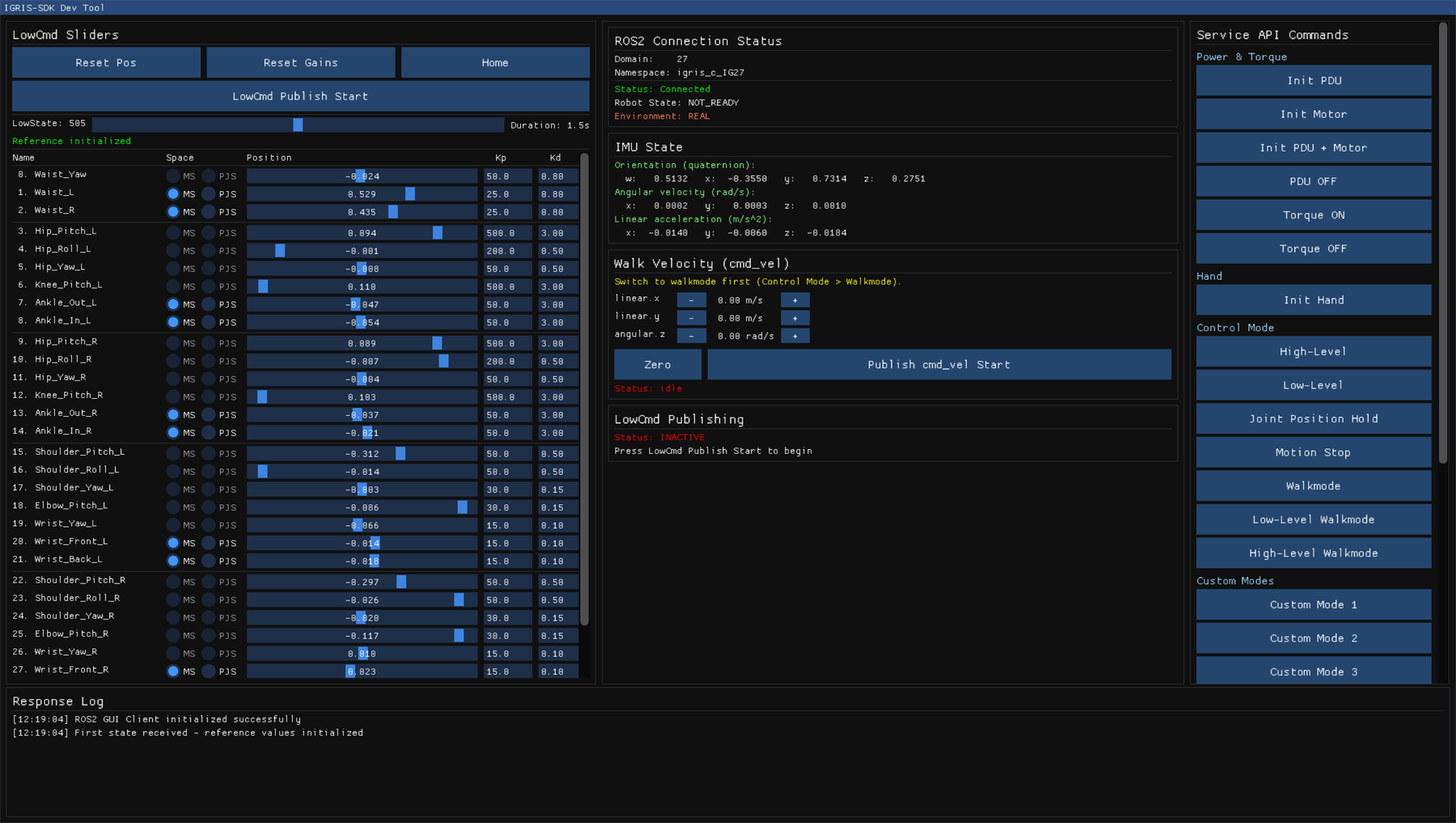
python/common.py is a shared module used by the Python examples. The 2.1.0 cyclonedds_sensor_config example and the MetaQuest example have been removed from the distribution, because the corresponding features were removed.
URDF
URDF files for all IGRIS-C versions can be downloaded from the Description repository above.
SDK Overview
⚠️ v2.1.1 compatibility: In 2.1.1, topic names, message types and service names have all changed. A 2.1.0 SDK client cannot communicate with a 2.1.1 robot, and when this happens the two sides silently fail to discover each other, with no error (0 FPS, service timeouts). Replace the SDK distribution with 2.1.1 and rebuild the examples and your own code.
1. Middleware
IGRIS-C uses DDS as its message middleware, employing two main data communication methods: Publish/Subscribe mode and Request/Response mode.
Publish/Subscription
Receivers subscribe to messages, and senders transmit messages to receivers according to the subscription list. This method is primarily used for medium-to-high frequency or continuous data exchange.
Request/Response
Data queries or actions are performed through requests. This method is used for low-frequency data exchange or function switching.
2. Architecture Description
Commands and state information delivered through the SDK are primarily implemented via DDS. The DDS-based communication structure enables reliable, real-time data exchange between modules.
DDS Middleware
IGRIS-C and its related SDKs exchange commands and state information on top of this DDS middleware, providing a scalable and consistent communication structure between internal modules and external development PCs.
Motion Control (the low-level control engine that directly generates and maintains the robot's motion)
The Motion Control module is IGRIS-C's core low-level motion control engine, operating based on a very fast internal control loop.
Key Features
High-frequency low-level control loop
Control loop execution at μs–ms intervals in the internal control code
High-speed updates of torque, velocity, and position commands for each joint/motor
CAN communication-based motor control
Encodes received control commands into CAN messages and delivers them to each motor
Collects motor status (current, velocity, temperature, angle, etc.) in real time and transmits it to DDS
State information → delivered to DDS middleware
Various sensor values such as IMU, joint angles, and dynamic states are published as DDS topics and can be subscribed to from the development PC
Processing commands received from DDS
Receives DDS motion commands published by an external development PC
Applies them immediately within the control loop and reflects them to the motors
Image Services
The Image Services module handles image stream processing and external communication for IGRIS-C.
Key Features
Camera image processing and streaming
Collects image frames from cameras connected to IGRIS-C
Transmits directly via DDS
Camera streams also follow the robot's transport mode. Receiving them on the ros lane requires a one-time setup on the receiving PC (see Section 3).
Supported interfaces: The SDK provides three client interfaces — DDS (Cyclone DDS), ROS2, and Python. Examples are located in the
cyclonedds/,ros2/, andpython/folders of the distribution respectively. Which interface can reach the robot is decided by the robot's transport mode (see Section 3). (The previous documentation's notice of "ROS2 planned for later" is no longer valid — ROS2 is now officially supported.)
3. Transport Mode
IGRIS-C serves exactly one external communication lane, and the robot's igris_c.network.transport (Web Viewer, Config tab) decides both the lane and the on-the-wire topic layout. The lane applies to the bridge, cameras and master arm alike. The TCP API used by the app (default port 9000) is always served, regardless of the lane.
If ROS 2 cannot be installed or is not used in your environment, use the cyclonedds_native lane with the C++/Python SDK (cyclonedds/, python/). Cyclone DDS is bundled with the SDK, so there is no ROS 2 dependency, and the topics and services are the same as on the ros lane.
Robot | Middleware | Wire name of | Services | Examples to use |
|---|---|---|---|---|
| Cyclone DDS (bundled with the SDK) |
|
|
|
| Cyclone DDS |
| The same topic pairs as above. They do not appear in |
|
| ROS 2 (rclcpp, robot rmw = Fast DDS) |
| Real rclcpp services |
|
Published on every lane:
lowstate,handstate,pdustate,robotstate,odom,torso_twist_odom. Subscribed on every lane:lowcmd,handcmd,cmd_vel(geometry_msgs/TwistStamped). Theroslane additionally provides theimu_state,motor_stateandjoint_statetopics.Selecting the layout on the client: C++
ChannelFactory::Instance()->Init(domain_id, ns, "", TopicNaming::RosCompatible), Pythonchannel.Init(domain_id, ns, "", igc_sdk.parse_topic_naming("ros_compatible")). The examples accept the--dds-topic-namingflag (exceptclient.ipynb).The 2.1.0 values
cycloneddsandbothare no longer used; if one is still set, the robot warns and treats it ascyclonedds_native. DDS and ROS 2 are no longer served at the same time as in 2.1.0.Networks where multicast is blocked (Wi-Fi robot + wired PC): use
cyclonedds/cyclonedds_peers.xmlon the cyclonedds lanes andros2/fastdds_peers.xmlon the ros lane (edit the robot IP into the file's<address>, setFASTRTPS_DEFAULT_PROFILES_FILE, thenros2 daemon stop).ROS_STATIC_PEERSis not a substitute, because it does not widen the participant range.To receive camera streams on the ros lane, run
ros2/setup_client_network.shonce on the receiving PC (sysctl settings for the receive buffer and the IP reassembly pool).
cyclonedds_native (factory default) · cyclonedds_ros_compatible
# from the cyclonedds/ folder of the package (domain id and namespace must match the robot)
export CYCLONEDDS_URI=file://$PWD/cyclonedds_spdp.xml
./build/cyclonedds_gui_client 0 igris_c_IG01               # state monitor GUI (domain 0, unit IG01)
./build/cyclonedds_service 0 igris_c_IG01                  # service console (PDU / torque / hand / control mode)
python3 ../python/sdk_gui_client.py --domain-id 0 --namespace igris_c_IG01   # Python example

# when multicast does not reach the robot — first edit the robot IP into <Peer address> in cyclonedds_peers.xml
export CYCLONEDDS_URI=file://$PWD/cyclonedds_peers.xml

# if the robot runs cyclonedds_ros_compatible, add --dds-topic-naming ros_compatible to each example.
ros
# from the workspace where the ros2/ package is built (ROS_DOMAIN_ID and namespace must match the robot)
ROS_DOMAIN_ID=0 ros2 run igris_c_sdk ros_lowstate_listener --ros-args -p robot_namespace:=igris_c_IG01

# when multicast does not reach the robot — first edit the robot IP into <address> in fastdds_peers.xml
export FASTRTPS_DEFAULT_PROFILES_FILE=$PWD/fastdds_peers.xml
ros2 daemon stop
⚠️ The robot and the client must agree on all four: lane, topic layout, namespace and domain_id. If any one differs, the two sides silently fail to discover each other, with no error (0 FPS, service timeouts). The robot's domain_id is
igris_c.network.cyclonedds.domain_id(default 0).
4. Robot Namespace (topic prefix)
All DDS topics are resolved under a namespace specific to each robot unit. Each unit has a different namespace, in the form of the igris_c_ prefix followed by a per-robot suffix (which varies by unit). Example: igris_c_IG01.
Check the namespace of the robot you connect to in the Web Viewer or on the robot's OLED display.
In the SDK, the namespace is specified using
ChannelFactory::Init(domain_id, namespace).In code, write only the bare topic name (
lowstate); the SDK builds the actual topic name on the wire. Thert/segment is added by the ROS 2 rmw, so the native layout has none.TopicNaming::Native(default, robot oncyclonedds_native): namespaceigris_c_IG01+lowstate→igris_c_IG01/lowstateTopicNaming::RosCompatible(robot oncyclonedds_ros_compatible): →rt/igris_c_IG01/lowstate. This is identical to what the ROS 2 rmw mangles/igris_c_IG01/lowstateinto, so a rclcpp node can subscribe without switching its rmw.
The layout is set with the 4th argument of
ChannelFactory::Init(),TopicNaming(Nativeif omitted). The examples take it as the--dds-topic-naming native|ros_compatibleflag.
// C++
ChannelFactory::Instance()->Init(0, "igris_c_IG01");                  // domain 0, unit IG01
Subscriber<igris_c_sdk::msg::dds_::LowState_> sub("lowstate", QosProfile::SensorData());   // → igris_c_IG01/lowstate

// when the robot is on cyclonedds_ros_compatible
ChannelFactory::Instance()->Init(0, "igris_c_IG01", "", TopicNaming::RosCompatible);      // → rt/igris_c_IG01/lowstate
# Python
channel = igc_sdk.ChannelFactory.Instance()
channel.Init(0, "igris_c_IG01")
# when the robot is on cyclonedds_ros_compatible
channel.Init(0, "igris_c_IG01", "", igc_sdk.parse_topic_naming("ros_compatible"))⚠️ The development PC (SDK client) and the robot must use the same namespace + domain_id for communication to work. Verify and set the namespace of the unit you intend to connect to. On the cyclonedds lanes, the topic layout (
TopicNaming) must match the robot as well.
Before running the examples — the CYCLONEDDS_URI environment variable
DDS communication uses a CycloneDDS XML file containing the network interface configuration. When running SDK examples on an external development PC, this XML must be specified via CYCLONEDDS_URI to connect to the robot's DDS network. Two example XML files are bundled in the cyclonedds/ folder of the distribution (the same files are also in python/). This section applies to the cyclonedds lanes; for the ros lane, follow the fastdds_peers.xml instructions in Section 3.
File | Discovery | Use when |
|---|---|---|
| Multicast (default) | PC and robot on the same network segment — start here |
| Unicast to a listed address | Multicast does not reach the robot (typically a Wi-Fi robot + wired PC) |
Edit the
<NetworkInterface name="...">to the name of the network interface on this PC that communicates with the robot. (To check available interfaces:ip link, or setautodetermine="true"for automatic selection.)cyclonedds_peers.xmlalso needs the robot's IP in<Peer address="...">.Export
CYCLONEDDS_URIto point to this file before running the examples.
# From the cyclonedds/ folder of the distribution
export CYCLONEDDS_URI=file://$(pwd)/cyclonedds_spdp.xml

# Then run the example
./build/cyclonedds_hand_example 0 igris_c_IG01
# when the robot is on cyclonedds_ros_compatible
./build/cyclonedds_hand_example 0 igris_c_IG01 --dds-topic-naming ros_compatible
⚠️ If an example runs but no data arrives at all — every stream at 0 FPS, services timing out, and no error anywhere — discovery has not completed. Blocked multicast is the most common cause; switch to
cyclonedds_peers.xml. A mismatched transport mode, topic layout, namespace or domain_id shows the same symptom. A topic that nobody publishes is not an error, so it is never reported as one.
If this is not set, or the interface is incorrect, participant discovery will fail and topics will not be visible. Namespace and domain_id are specified via example arguments (or
ChannelFactory::Init), not the XML file.
5. Get SDK
SDK Introduction
igris_c_sdk is a next-generation robot SDK developed by ROBROS. This SDK encapsulates interfaces such as basic motor control and advanced motion control, and provides related functional interfaces.
By referring to the provided SDK and examples, you can learn robot control and complete Secondary Development for IGRIS-C.
SDK Download
Description: igris_c_description_public v2.1.1
Master arm: igris_c_masterarm_public v2.0.6
Use these versions with robot software 2.1.1. The
mainbranch of each repository may move to later releases.
Distribution layout — the top-level folders are independent of each other; pick the one that matches your runtime.
dist/— Python wheel (igris_c_sdk-*.whl)cyclonedds/— native C++ SDK (headers, static library, bundled Cyclone DDS), example sources,cyclonedds_spdp.xml/cyclonedds_peers.xmlpython/— Python examples and a reproducible pixi environment (pixi.toml,pixi.lock)ros2/— the ROS 2 ament packageigris_c_sdk(message/service definitions + example nodes),fastdds_peers.xml,setup_client_network.sh. Copy the package folderros2/src/igris_c_sdk_public/into thesrc/of your colcon workspace and build it there (placing the distribution root insrc/builds nothing).
Build environment and dependencies
Ubuntu 24.04 (x86_64), CMake 3.14 or later, C++17 (GCC 11+ / Clang 14+), Python 3.12. ROS 2 Jazzy is needed only for the
ros2/package;cyclonedds/andpython/bundle Cyclone DDS and build and run without ROS 2.libssl-devis required; the GUI examples needlibglfw3-dev·libgl1-mesa-dev, and the sensor viewers needlibopencv-dev.OpenCV is used only by the sensor viewers (
cyclonedds_sensor_viewer,ros_sensor_viewer,sensor_viewer.py). Configure fails if OpenCV is missing, so to build without the viewers pass-DIGRIS_C_BUILD_VIEWERS=OFF.
sudo apt install libssl-dev                            # required
sudo apt install libglfw3-dev libgl1-mesa-dev          # GUI examples
sudo apt install libopencv-dev                         # sensor viewers

# building without OpenCV
cmake -B build -S . -DIGRIS_C_BUILD_VIEWERS=OFF        # cyclonedds/
colcon build --cmake-args -DIGRIS_C_BUILD_VIEWERS=OFF  # ros2/
Examples — the C++ and ROS 2 examples take the domain id and namespace as arguments; the Python examples take
--domain-id/--namespace.
Capability | C++ ( | Python ( | ROS 2 ( |
|---|---|---|---|
Low-level control ( |
|
|
|
Service API (init / torque / control mode) |
|
|
|
End effector (hand) |
|
|
|
Walk velocity ( |
|
|
|
GUI client |
|
|
|
Sensor viewer (requires OpenCV) |
|
|
|
Notebook walkthrough | — |
| — |
ros_gui_client connected to a real robot (domain 27, igris_c_IG27, ros transport mode): joint sliders, connection state, IMU and the service buttons in one window. cyclonedds_gui_client has the same layout.
python/common.py is a shared module used by the Python examples. The 2.1.0 cyclonedds_sensor_config example and the MetaQuest example have been removed from the distribution, because the corresponding features were removed.
URDF
URDF files for all IGRIS-C versions can be downloaded from the Description repository above.